







-
 Agriculture
-
 Health-Care
-
 Environment
-
 Construction-Real-Estate
-
 Tools-Hardware
-
 Home-Garden
-
 Furniture
-
 Luggage-Bags-Cases
-
 Medical-devices-Supplies
-
 Gifts-Crafts
-
 Sports-Entertainment
-
 Food-Beverage
-
 Vehicles-Transportation
-
 Power-Transmission
-
 Material-Handling
-
 Renewable-Energy
-
 Safety
-
 Testing-Instrument-Equipment
-
 Construction-Building-Machinery
-
 Pet-Supplies
-
 Personal-Care-Household-Cleaning
-
 Vehicle-Accessories-Electronics-Tools
-
 School-Office-Supplies
-
 Packaging-Printing
-
 Mother-Kids-Toys
-
 Business-Services
-
 Commercial-Equipment-Machinery
-
 Apparel-Accessories
-
 Security
-
 Shoes-Accessories
-
 Vehicle-Parts-Accessories
-
 Jewelry-Eyewear-Watches-Accessories
-
 Lights-Lighting
-
 Fabric-Textile-Raw-Material
-
 Fabrication-Services
-
 Industrial-Machinery
-
 Consumer-Electronics
-
 Electrical-Equipment-Supplies
-
 Electronic-Components-Accessories-Telecommunications
-
 Home-Appliances
-
 Beauty
-
 Chemicals
-
 Rubber-Plastics
-
 Metals-Alloys

























































































































































































































































































- Masonry Materials
- Curtain Walls & Accessories
- Earthwork Products
- Fireproofing Materials
- Heat Insulation Materials
- Plastic Building Materials
- Building Boards
- Soundproofing Materials
- Timber
- Waterproofing Materials
- Balustrades & Handrails
- Bathroom & Kitchen
- Flooring & Accessories
- Tiles & Accessories
- Door, Window & Accessories
- Fireplaces & Stoves
- Floor Heating Systems & Parts
- Stairs & Stair Parts
- Ceilings
- Elevators & Escalators
- Stone
- Countertops, Vanity Tops & Table Tops
- Mosaics
- Metal Building Materials
- Multifunctional Materials
- Ladders & Scaffoldings
- Mouldings
- Corner Guards
- Decorative Films
- Formwork
- Building & Industrial Glass
- Other Construction & Real Estate
- Wallpapers/Wall panels
- HVAC System & Parts
- Outdoor Facilities
- Prefabricated Buildings
- Festive & Party Supplies
- Bathroom Products
- Household Sundries
- Rain Gear
- Garden Supplies
- Household Cleaning Tools & Accessories
- Lighters & Smoking Accessories
- Home Storage & Organization
- Household Scales
- Smart Home Improvement
- Home Textiles
- Kitchenware
- Drinkware & Accessories
- Dinnerware, Coffee & Wine
- Home Decor
- Golf
- Fitness & Body Building
- Amusement Park Facilities
- Billiards, Board Game,Coin Operated Games
- Musical Instruments
- Outdoor Affordable Luxury Sports
- Camping & Hiking
- Fishing
- Sports Safety&Rehabilitation
- Ball Sports Equipments
- Water Sports
- Winter Sports
- Luxury Travel Equipments
- Sports Shoes, Bags & Accessories
- Cycling
- Other Sports & Entertainment Products
- Artificial Grass&Sports Flooring&Sports Court Equipment
- Scooters
- Food Ingredients
- Honey & Honey Products
- Snacks
- Nuts & Kernels
- Seafood
- Plant & Animal Oil
- Beverages
- Fruit & Vegetable Products
- Frog & Escargot
- Bean Products
- Egg Products
- Dairy Products
- Seasonings & Condiments
- Canned Food
- Instant Food
- Baked Goods
- Other Food & Beverage
- Meat & Poultry
- Confectionery
- Grain Products
- Feminie Care
- Hair Care & Styling
- Body Care
- Hands & Feet Care
- Hygiene Products
- Men's Grooming
- Laundry Cleaning Supplies
- Travel Size & Gift Sets
- Room Deodorizers
- Other Personal Care Products
- Pest Control Products
- Special Household Cleaning
- Floor Cleaning
- Kitchen & Bathroom Cleaning
- Oral Care
- Bath Supplies
- Yellow Pages
- Correction Supplies
- Office Binding Supplies
- Office Cutting Supplies
- Board Erasers
- Office Adhesives & Tapes
- Education Supplies
- Pencil Cases & Bags
- Notebooks & Writing Pads
- File Folder Accessories
- Calendars
- Writing Accessories
- Commercial Office Supplies
- Pencil Sharpeners
- Pens
- Letter Pad/Paper
- Paper Envelopes
- Desk Organizers
- Pencils
- Markers & Highlighters
- Filing Products
- Art Supplies
- Easels
- Badge Holder & Accessories
- Office Paper
- Printer Supplies
- Book Covers
- Other Office & School Supplies
- Stationery Set
- Boards
- Clipboards
- Stamps
- Drafting Supplies
- Stencils
- Electronic Dictionary
- Books
- Map
- Magazines
- Calculators
- Baby & Toddler Toys
- Educational Toys
- Classic Toys
- Dress Up & Pretend Play
- Toy Vehicle
- Stuffed Animals & Plush Toys
- Outdoor Toys & Structures
- Balloons & Accessories
- Baby Food
- Children's Clothing
- Baby Supplies & Products
- Maternity Clothes
- Kids Shoes
- Baby Care
- Novelty & Gag Toys
- Dolls & Accessories
- Puzzle & Games
- Blocks & Model Building Toys
- Toddler Clothing
- Baby Clothing
- Kids' Luggage & Bags
- Arts, Crafts & DIY Toys
- Action & Toy Figures
- Baby Appliances
- Hobbies & Models
- Remote Control Toys
- Promotional Toys
- Pregnancy & Maternity
- Hygiene Products
- Kid's Textile&Bedding
- Novelty & Special Use
- Toy Weapons
- Baby Gifts
- Baby Storage & Organization
- Auto Drive Systems
- ATV/UTV Parts & Accessories
- Marine Parts & Accessories
- Other Auto Parts
- Trailer Parts & Accessories
- Auto Transmission Systems
- Train Parts & Accessories
- Universal Parts
- Railway Parts & Accessories
- Auto Brake Systems
- Aviation Parts & Accessories
- Truck Parts & Accessories
- Auto Suspension Systems
- Auto Lighting Systems
- New Energy Vehicle Parts & Accessories
- Auto Steering Systems
- Wheels, Tires & Accessories
- Bus Parts & Accessories
- Auto Performance Parts
- Cooling System
- Go-Kart & Kart Racer Parts & Accessories
- Air Conditioning Systems
- Heavy Duty Vehicle Parts & Accessories
- Auto Electrical Systems
- Auto Body Systems
- Auto Engine Systems
- Container Parts & Accessories
- Motorcycle Parts & Accessories
- Refrigeration & Heat Exchange Equipment
- Machine Tool Equipment
- Food & Beverage Machinery
- Agricultural Machinery & Equipment
- Apparel & Textile Machinery
- Chemical Machinery
- Packaging Machines
- Paper Production Machinery
- Plastic & Rubber Processing Machinery
- Industrial Robots
- Electronic Products Machinery
- Metal & Metallurgy Machinery
- Woodworking Machinery
- Home Product Manufacturing Machinery
- Machinery Accessories
- Environmental Machinery
- Machinery Service
- Electrical Equipment Manufacturing Machinery
- Industrial Compressors & Parts
- Tobacco & Cigarette Machinery
- Production Line
- Used Industrial Machinery
- Electronics Production Machinery
- Other Machinery & Industrial Equipment
- Camera, Photo & Accessories
- Portable Audio, Video & Accessories
- Television, Home Audio, Video & Accessories
- Video Games & Accessories
- Mobile Phone & Accessories
- Electronic Publications
- Earphone & Headphone & Accessories
- Speakers & Accessories
- Smart Electronics
- TV Receivers & Accessories
- Mobile Phone & Computer Repair Parts
- Chargers, Batteries & Power Supplies
- Used Electronics
- VR, AR, MR Hardware & Software
- Projectors & Presentation Equipments
- Other Consumer Electronics
- Cables & Commonly Used Accessories
- Computer Hardware & Software
- Displays, Signage and Optoelectronics
- Discrete Semiconductors
- Wireless & IoT Module and Products
- Telecommunications
- Connectors, Terminals & Accessories
- Development Boards, Electronic Modules and Kits
- Circuit Protection
- Sensors
- Isolators
- Audio Components and Products
- Integrated Circuits
- Power Supplies
- Relays
- RF, Microwave and RFID
- Electronic Accessories & Supplies
- Passive Components
- PCB & PCBA
- Air Quality Appliances
- Home Appliance Parts
- Heating & Cooling Appliances
- Small Kitchen Appliances
- Laundry Appliances
- Water Heaters
- Water Treatment Appliances
- Refrigerators & Freezers
- Personal Care & Beauty Appliances
- Major Kitchen Appliances
- Cleaning Appliances
- Second-hand Appliances
- Smart Home Appliances
- Other Home Appliances
- Energy Chemicals
- Inorganic Chemicals
- Basic Organic Chemicals
- Agrochemicals
- Admixture & Additives
- Catalysts & Chemical Auxiliary Agents
- Pigments & Dyestuff
- Coating & Paint
- Daily Chemicals
- Polymer
- Organic Intermediate
- Adhesives & Sealants
- Chemical Waste
- Biological Chemical Products
- Surface Treatment Chemicals
- Painting & Coating
- Chemical Reagents
- Flavor & Fragrance
- Non-Explosive Demolition Agents
- Other Chemicals
- Custom Chemical Services

How to Build Strong Warranty Evidence for UV Flatbed Printer Defects
A successful UV flatbed printer warranty claim depends on a complete, traceable evidence package. Instead of sending only a photograph, record when the problem occurred, which machine function was affected, what materials were used, and how the finished output differed from the expected result. Keep the original files, test samples, operating notes, maintenance history, and all supplier communications together in one dated case folder.
Warranty Evidence Checklist
- Write down the machine model, serial number, test date, affected function, material, ink configuration, operating settings, and visible symptom.
- Take photographs of the complete printed result and close-ups of the damaged or inconsistent area. Use continuous video to show the machine process and preserve the original timestamped files.
- For the NC-UVDTF60-PLUS, identify whether the issue involves UV crystal labels, UV TPU heat-transfer labels, color printing, white ink, varnish, laminating, unwinding, or rewinding.
- Record the intended application and substrate, such as glass, metal, acrylic, plastic, footwear materials, or luggage accessories. Keep the material unchanged during the verification test.
Connect the Symptom to the Machine Process
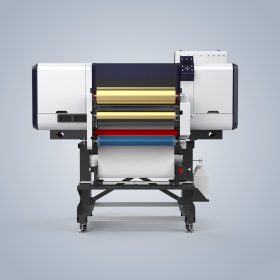
A useful claim should make it easy for the technical team to determine where the failure occurs. The NC-UVDTF60-PLUS integrates material feeding, printing, laminating, and take-up operations. It is equipped with an Epson I1600-E1 printhead and supports color, white ink, varnish, and 3D foil effects. Explain whether the defect begins during unwinding, image formation, lamination, or rewinding.
Document Print and Ink Problems
Save the full output as well as a detailed view of the affected section. If the problem concerns color accuracy, missing white ink, varnish coverage, banding, or another print-layer issue, name the affected layer and retain the original sample. Include the file or test pattern used, when available, so the supplier can compare the requested result with the actual print.
Document Application and Material Handling Problems
For adhesion or transfer failures, state the label type, substrate, application method, and test result. For problems involving glass, metal, acrylic, plastic, footwear materials, or luggage accessories, identify the exact surface used. When the issue involves material movement, film wrinkles, inaccurate alignment, or take-up tension, record the full path from unwinding through laminating and rewinding.
Use a Repeatable Test Record
Run the same controlled test whenever practical. Note the selected application, input material, requested output, machine status, operating conditions, observed result, and whether the defect can be reproduced. Do not alter, crop, or repeatedly compress the original photos and videos. Use filenames that include the date and a short defect code, then place the evidence, printed sample references, maintenance records, and support messages in the same folder.
The product information mentions aging tests and 100% inspection as quality-control measures. It also lists online support, video calls, remote control, a user manual, an installation video, and spare-part change videos as after-sales resources. When contacting the supplier, ask for a specific diagnostic sequence and preserve the instructions, remote-session notes, and follow-up results with the claim.
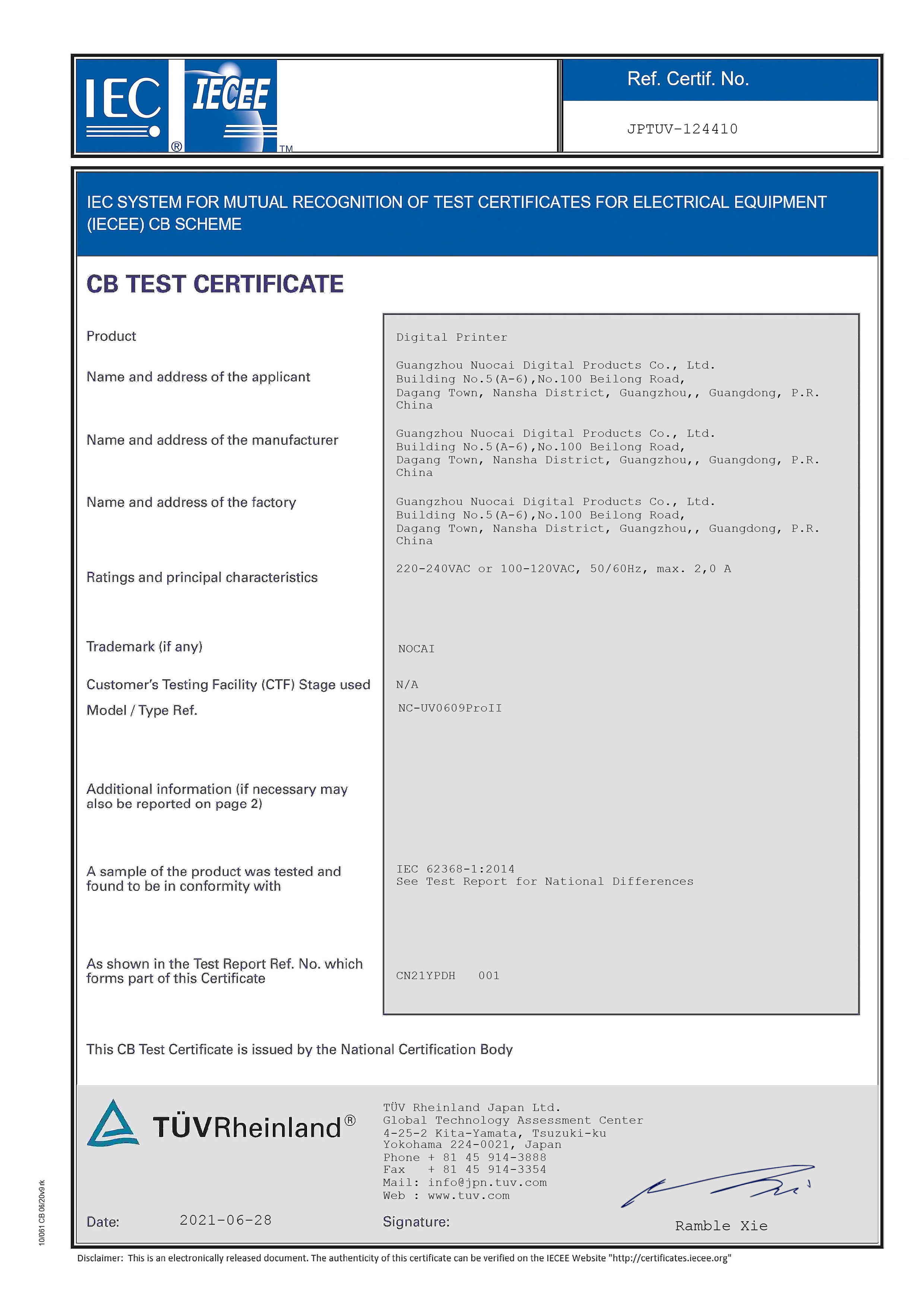
The company profile references TUV certification for the NC-UV0609PROII and ISO certification related to the design and production of digital printers. These references should be understood as company or specified-product credentials, not automatic proof that every NC-UVDTF60-PLUS defect is covered under warranty. Always identify the actual machine model and submit evidence specific to its failure.
Customer cooperation cases from Korea, Indonesia, India, Poland, Turkey, and Malaysia mention machine stability, print quality, technical support, and long-term cooperation. Such feedback provides general service context, but it cannot replace a defect-specific record for the machine involved in the claim.
Evidence Categories at a Glance
| Evidence Category | Information to Include | Related Product or Service Detail |
|---|---|---|
| Print performance | Complete print, close-up image, affected color or ink layer, test file, and original sample | Color printing, white ink, varnish, and Epson I1600-E1 printhead |
| Substrate and application | Material type, label format, application surface, application method, and repeatability | UV crystal labels, UV TPU heat-transfer labels, glass, metal, acrylic, plastic, footwear materials, and luggage accessories |
| Film transport | Continuous footage of feeding, laminating, and take-up, with the failure point identified | Integrated unwinding, laminating, and rewinding |
| Inspection history | Machine identification, test conditions, maintenance details, defect description, and dates | Aging testing and 100% inspection listed for the product |
| Technical support | Initial request, troubleshooting steps, remote-session record, replacement guidance, and outcome | Online support, video calls, remote control, manuals, installation videos, and spare-part change videos |
Frequently Asked Questions
What details belong in the defect description?
State the affected process, visible symptom, substrate, output type, operating stage, date, machine status, and repeatability. Terms such as color printing, white ink, varnish, laminating, feeding, and rewinding help the technical team classify the issue accurately.
What evidence is most persuasive in a UV printer warranty case?
The strongest package combines original photographs, uninterrupted video, the defective print or transfer sample, machine and material information, controlled test notes, maintenance records, and supplier correspondence. Show both the entire output and the detailed fault so the symptom can be matched to a particular process.
How should remote troubleshooting be recorded?
Send the evidence package before the support session. During online support, a video call, or remote-control session, record the checks performed, instructions received, parts discussed, machine condition, and result of the next test. Keep the complete exchange in the same warranty case folder.
Conclusion
A well-prepared UV flatbed printer claim is a chronological technical record. Identify the failed process, preserve unedited evidence, describe the material and application, and connect every supplier response to the same case reference. Nocai lists full industrial-chain distribution and direct sales, a minimum order quantity of one unit, 5–7 day delivery, 100% inspection, and a comprehensive after-sales service system. For detailed technical solutions or support, please reach out to us via nc05@gznuocai.com.
About Us
Guangzhou Nuocai Digital Products Co., Ltd., also known as Nocai, is described as a high-tech enterprise specializing in digital inkjet printing technology research and development, as well as the design, development, manufacturing, sales, and after-sales service of inkjet printers. Its listed R&D capability includes more than 50 professional R&D engineers and designers and five production lines. Its main products are UV printers, UV DTF printers, and rotary printers. The company profile lists TUV and ISO certifications, and its cooperation cases cover clients across multiple regions.

REPORT